
What has changed
There are five main changes/improvements to the Risk Module described in short below (followed by a more extensive explanation)
Note: If you have already used the Risk Module, all data will be saved. More on that later.
| Change | Description |
|---|---|
| 1. Fewer tabs |
Before you had the option to make risk assessments based on how on whether you were assessing Data Subjects (people), your organization or society (NIS2) For simplicity, you can now Risk Assess your asses only based on Privacy and Security. |
| 2. Preliminary risk score removed | The preliminary risk score has been removed. You now prioritize assets based on their criticality. |
| 3. Copy information from other assets |
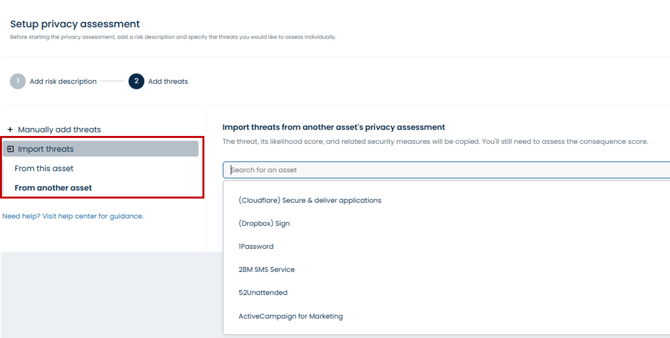
When starting a new risk assessment, you can now copy threats and security measures, either from another asset or from the asset’s existing privacy/security assessment |
| 4. AI assistance | AI can be used to suggest threats or help complete parts of a risk assessment. |
1. Fewer tabs + 2 Preliminary risk score removed
Before:
You would have the option to risk assess systems and vendors based on GDPR, Information security or NIS2. Also you had the option of making preliminary risk scores based on 'consequence' and 'likelihood'. See below: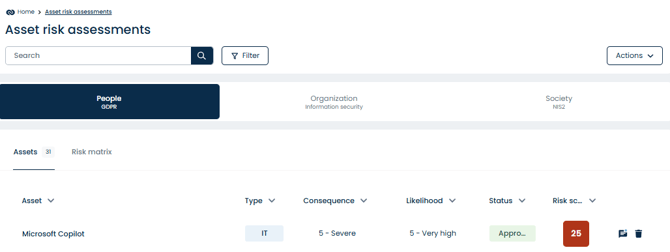
Note: The preliminary risk-scoring has been removed
Now:
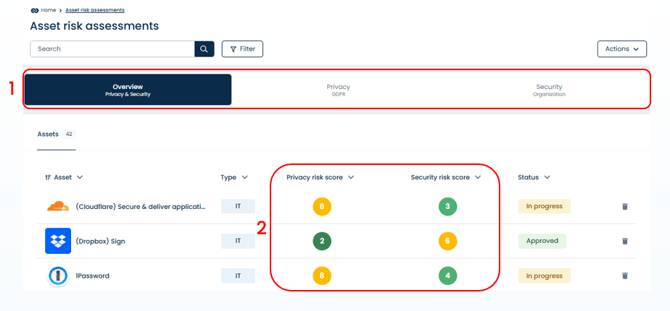
1: The Organization and the Society (NIS2) tabs have been merged into a single tab. so you now only risk assess systems and assets based on Privacy or Security. A new 'overview-tab' will appear showing you a summary of 2: Privacy -and Security scores for of each of your assets.
Overview tab:
Privacy tab: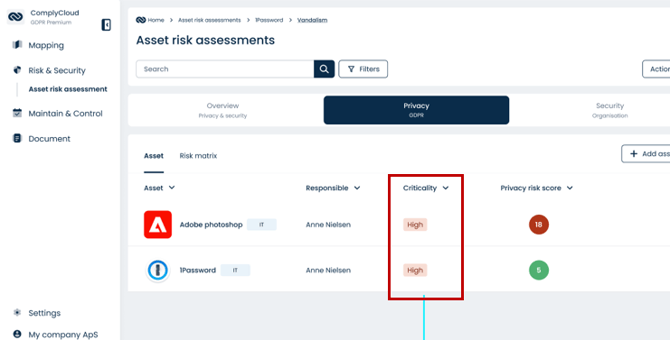
Tip: Click the criticality and you will be guided through how to set a criticality score - use this as prioritized list of assets you should risk assess and start with the most critical ones.
3. Copy information from other assets
Now you can import threats and security measure from other assets when starting a new risk assessment. This enables you to copy over work from assessments you have already done.
AI Assistance
For each threat assessment you can use AI to help you suggest risk scores, risk descriptions and mitigations hence completing parts of your risk assessment. 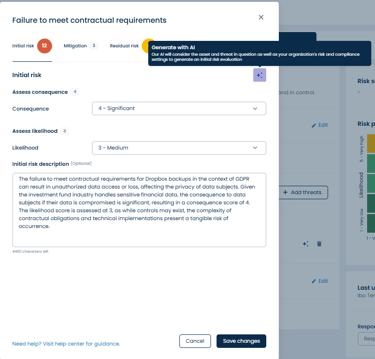
Tip: Read more about how to make Risk Assessments in ComplyCloud here
The AI feature can help suggest threats, risk descriptions, and possible mitigations. While this can save time, we recommend using AI suggestions with caution and always reviewing them before using them in your assessments. ComplyCloud takes no responsibility for the output of the AI feature.
Things to be aware of
- Risk descriptions:
AI does not always distinguish correctly between privacy-related risks and business risks. Always check that the description fits the type of assessment you are doing. - Threat suggestions:
The suggested threats may not always be relevant to your situation. You can edit or replace them using the predefined threats available in the risk catalogue - Initial risk scoring:
AI-generated consequence and likelihood scores can vary and may not match the context of the asset. Always adjust the values based on your own judgement and knowledge of the system.
Mitigations:
When adding security measures, check that they are applied correctly to each threat. AI sometimes mixes up whether a control reduces the likelihood or the consequence of a risk. Review and correct this if needed.
Recommended approach
- Use AI as support, not as a replacement for human assessment.
- Review and edit all text, threats, and scores before saving.
- For complex or critical assessments, complete the evaluation manually.
Tip: AI can still be useful for drafting or inspiration but every generated suggestion should be verified before it becomes part of your official risk assessment.